Docs/Getting Started/Key Concepts

Key Concepts

Before diving deeper into EC-Permit, it's helpful to understand the core concepts that power the system. This foundation will help you work more effectively.

Projects

A Project is the top-level container in EC-Permit. It typically represents a physical site, construction project, or organizational unit where permits are managed.

Project includes:

  • Project name, code, and address
  • Form types specific to this project
  • Team members and their roles
  • Project-level settings and preferences
  • VIP subscription tier (affects available features)
You can be a member of multiple projects and switch between them using the project switcher in the sidebar.

Form Types

A Form Type is a template that defines what information a form collects and how it flows through approvals. Examples include "Hot Work Permit", "Confined Space Entry", or "Daily Safety Checklist".

Form Type defines:

  • Questions: The fields users fill out (text, dates, signatures, etc.)
  • Workflow: The statuses and approval chain
  • Permissions: Who can see/edit at each stage
  • PDF Template: How the form looks when exported

When users create a form, they're creating an instance of a form type. The form type determines what they can fill in and what happens next.

Workflows

A Workflow defines the lifecycle of a form—from creation to completion. It's built from statuses and actions that move forms between statuses.

Statuses

Statuses represent the current state of a form. Common examples:

DraftPending ReviewPending ApprovalApprovedRejectedCompleted

Actions

Actions move a form from one status to another. Each action can:

  • Require specific permissions to perform
  • Require a comment before completing
  • Send notifications to relevant users
  • Update form data or timestamps

Example Workflow:

Draft→ Submit →Pending Approval→ Approve →Approved

Roles & Permissions

Roles define what users can do within a project. Each role has a set of permissions that control access to features and actions.

Built-in Roles

  • Admin: Full access to project configuration, users, and forms
  • Manager: Can approve forms and view reports
  • User: Can create and submit forms
  • Viewer: Read-only access to forms

Custom Roles

Project admins can create custom roles with specific permission combinations. For example, a "Safety Officer" role that can approve safety permits but not modify form types.

Permissions are checked at every level: viewing forms, editing data, taking actions, and accessing admin features.

Users & Invitations

Users are added to projects through invitations. When you invite someone, you specify:

  • Their email address
  • The role they'll have in the project

The invited user receives an email with a link to accept the invitation. If they don't have an EC-Permit account, they'll be prompted to create one.

VIP Tiers

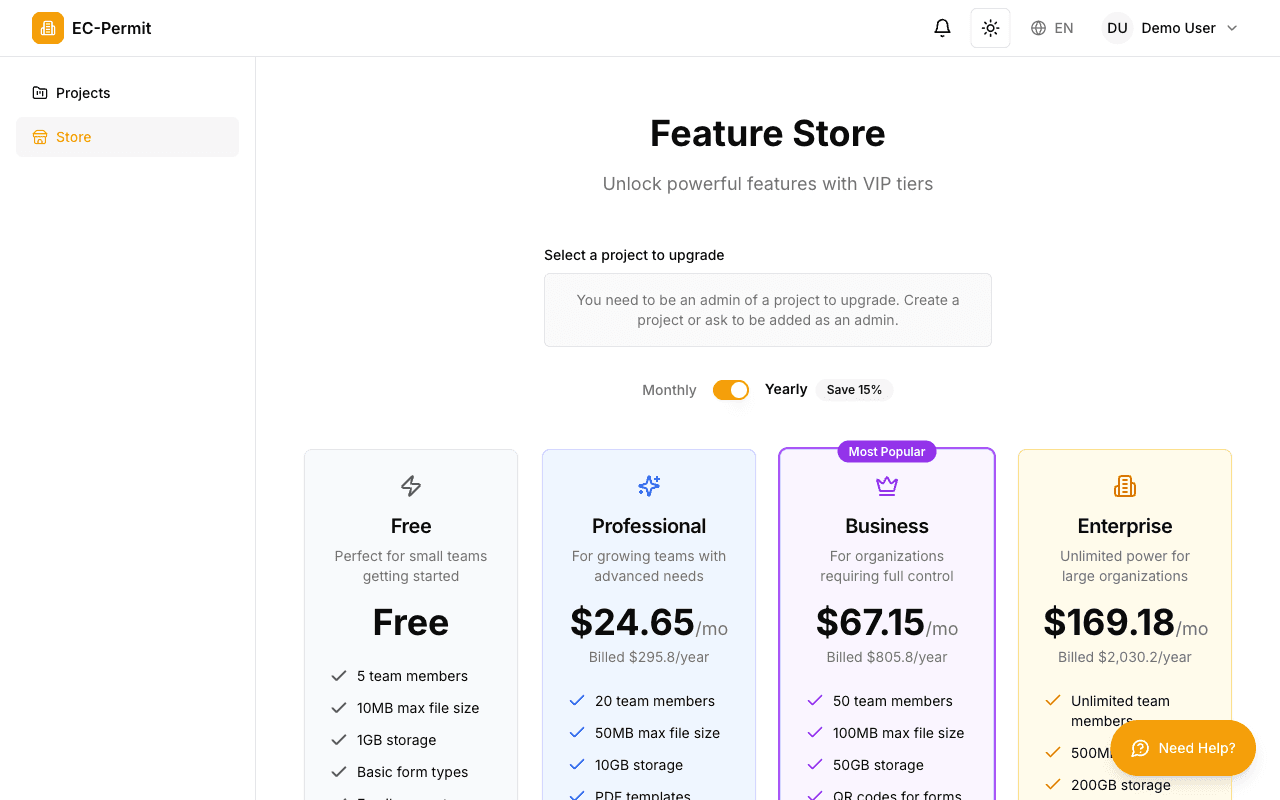
EC-Permit offers a free tier with essential features. VIP subscriptionsunlock advanced capabilities:

EC-Permit Feature Store showing Free, Professional, Business, and Enterprise tiers
The Feature Store allows you to upgrade your project to unlock advanced features

Free

  • ✓ 3 form types
  • ✓ 10 users
  • ✓ Basic workflows
  • ✓ PDF export

VIP

  • ✓ Unlimited form types
  • ✓ Unlimited users
  • ✓ AI form creation
  • ✓ API access

Enterprise

  • ✓ Everything in VIP
  • ✓ Custom branding
  • ✓ Priority support
  • ✓ SLA guarantee

Quick Reference

Project
Container for forms, users, and settings
Form Type
Template defining questions and workflow
Form
An instance of a form type with actual data
Workflow
Statuses and actions defining form lifecycle
Role
Set of permissions assigned to users